









































The print engine in the 5105 isn’t substantially different from the print technology HP has been selling with cartridge designs for some years.
\nThis one has a single rear-loading paper system that can accept up to 100 sheets depending on the thickness of the paper. Paper handling is one of the features of this printer that we didn’t care for.
\n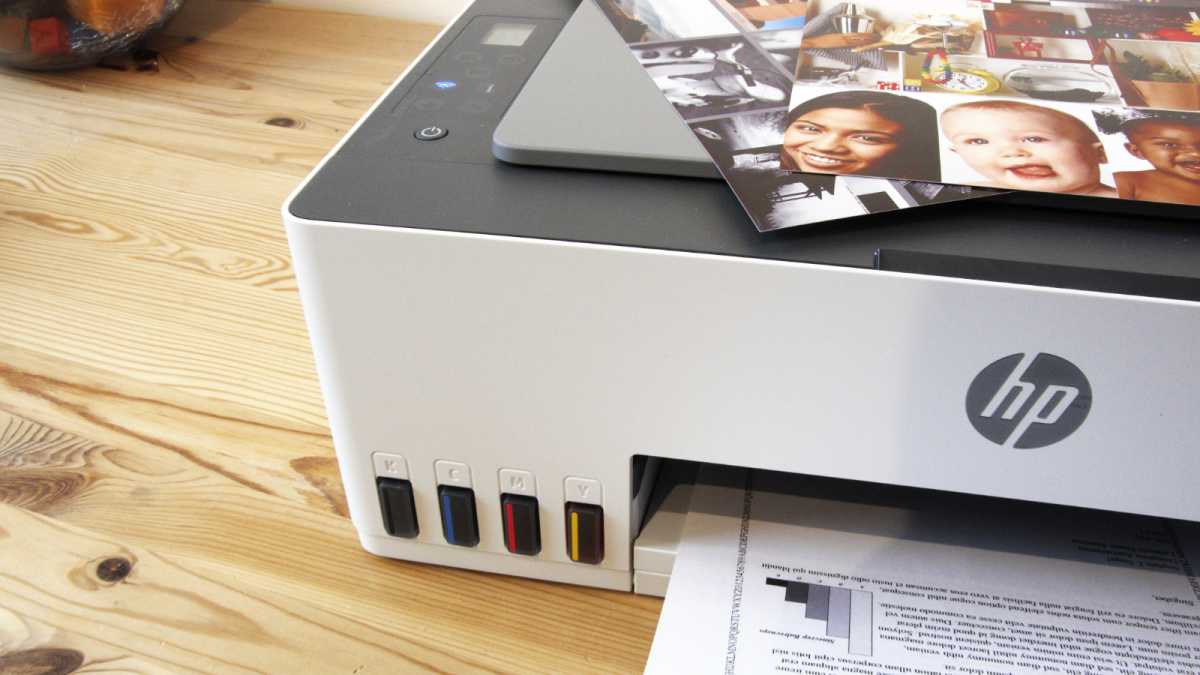 \n
\nVisible ink tanks allow the user to see how much ink is left
\nMark Pickavance
\nThe angled ramp that the paper sits on only has one moveable paper guide on the left side that forces the paper against a fixed edge on the right. This arrangement works well enough with thin A4 stock, but if the rollers don’t grip smaller photo paper cleanly, it can easily get damaged on the fixed side of the path.
\nWe had this happen several times with A5 and 10×15 cm paper, making the damaged prints unusable.
\nEqually, the output area is a very narrow and thin plastic extension that is only 10cm wide. Because of the paper feeding, it is only the right, and the output limit of 30 pages may be due to any more being liable to break this fragile-looking ramp.
\nGiven the paper handling and its fragility, it seems curious that HP seemed happy to include some less-obvious features
\nSome ‘ink tank’ printers don’t have ink-level sensors, but the 5015 does, and it also has smart power management that can sleep the printer when not in active use.
\nThe control cluster has a tiny LCD for controlling the copier function, although all the controls here are duplicated on the HP smartphone application. You can scan from a computer or phone, but with no location for the scanned images to go on the bare printer, the scanner is only useable in a copy mode on a stand-alone configuration.
\nThe monthly duty cycle of the 5105 is 3,000 A4 pages, or roughly 150 pages a day, but the recommended monthly use is just 400-800 pages, or between 20 and 40 pages daily.
\nOn this basis, even if printing is relatively cheap, the 5015 isn’t a replacement for a high-volume laser printer or a mono tank printer built for speed and durability.
\nThe scanner is a single-sheet flatbed mechanism meant for occasional copying and scanning, but it wouldn’t provide the foundations for a document imaging solution.
\nBefore we talk about print performance, let’s talk about ink.
\nAn equivalent Epson EcoTank printer to the HP 5105 is the EcoTank ET-1810, which comes with four 65ml bottles of ink, totalling 260ml. The HP 5105 comes with a single 135ml black bottle and three 50ml mini bottles, which is 15ml more ink overall but includes less colour ink.
\nFor those wondering, it isn’t possible to purchase 50ml colour ink bottles from HP, as the standard size is 70ml. These little50ml bottles are much like the partially filled ‘starter’ ink cartridges that HP loves so much. Epson, on the other hand, tends to include standard-capacity ink with its EcoTank printers.
\nAs priming the system takes some ink that must remain in the system, these 50ml bottles could result in the coloured ink not going as far as you might anticipate.
\n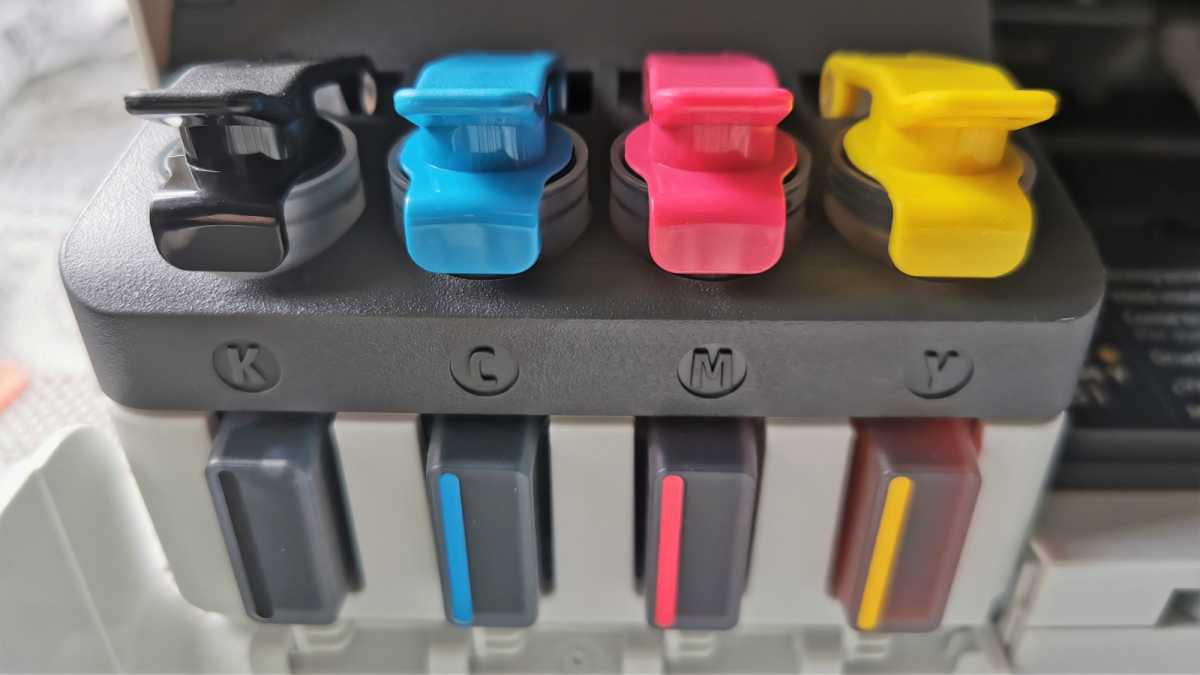
Mark Pickavance
\nThankfully the tanks are visible and give a good indication if you are using one particular colour more than the others and when it might be appropriate to refill. All the Epson EcoTank designs we’ve seen so far also rely on the owner to input an ink level for the printer to track, but HP has sensors that detect ink levels and warn the user if they’re getting too low.
\nThat’s a critical feature because should air be drawn into the tubes that feed the printhead, it might cause blockages. Or, in a worst-case scenario, cause the ink to dry in the tubes or head. In this respect, maintaining good ink levels is essential for all tank printers.
\nWhere this design is less remarkable is the initial configuration, where the process of getting it running is quite convoluted. However, HP does provide decent documentation to help you get through it.
\n\n\nHP has sensors that detect ink levels and warn the user if they’re getting too low
\n
After removing all the annoying blue tape and connecting the printer to power, you can load the inks. HP doesn’t use any sort of keyed connector like Epson, relying instead on the customer to put the right colours in the correct tanks. That process is relatively painless, simply working across the tanks plugging each bottle in and watching the ink glug into the reservoir below.
\nSome ink is required to prime the system, and we were curious to see exactly how much ink would be used up. From the black 135ml bottle, it took more than half, and we entirely emptied the 50ml colour bottles into the respective tanks. Therefore, a good rule of thumb is that each colour tank and the lines to the printhead represent about 70ml of capacity, which is the same size as the replacement colour bottles, which makes sense.
\nOnce the ink is loaded, the printhead carriage moves to the centre to have the printheads installed, which is something of a fiddly exercise. With that task complete, the printer will print an alignment sheet that you then scan to get the settings back in the printer. This is obviously a well-tested solution, and as long as you follow the provided instructions, it should be achievable by most users.
\nAnd finally, you can use the HP Smart app on your phone to connect the printer to a local Wi-Fi network where you can print from any computer on that network, regardless of whether it’s a phone, tablet, laptop, PC or Mac.
\nThe first thing to say about the HP 5105 is that this isn’t a high-speed printer.
\nThe quoted speeds are 12 pages per minute for black-and-white pages and just 5 ppm for colour, which begs the immediate question of why the colour output is so slow in comparison with the black.
\nThe answer is that where the entire print head allocated to black gets 704 nozzles, the three colours are forced to share a head with just 588 nozzles in total, or 196 nozzles for each colour. This is undoubtedly the result of repurposed cartridge printing technology. With more nozzles allocated to the colour side of this equation, it might have been faster at colour printing.
\nIt is also worth noting that those quoted speeds are for ISO print standards and that depending on the specific content you print, the actual speeds experienced can be faster or slower. For monochrome printing, the first page is supposed to arrive as fast as 14 seconds, and a colour print could start in as little as 21 seconds.
\nDraft printing can reduce print time if you are happy to accept the lower-quality output that mode entails.
\n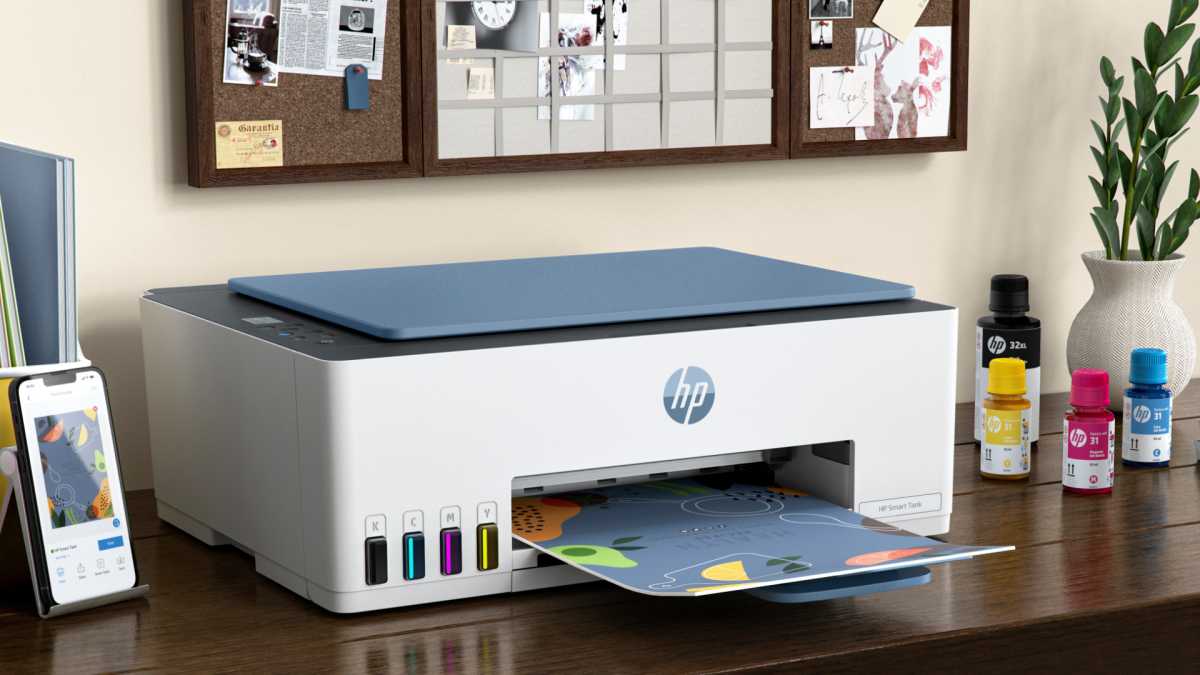
HP Development Company
\nIn our testing of the ISO standard page with 5% coverage, the first print appeared on schedule at 14 seconds, and then subsequent prints of the same content arrived every 12 seconds, using standard quality.
\nPrinting a 15 x 10 cm (6x4in) photo in standard quality over Wi-Fi took only six seconds for the printer to spring into action, and the print took a further 72 seconds to complete. A full borderless A4 image at standard quality took around a minute to initialise and then 3 minutes and 44 seconds to print. Using high-quality mode could extend the time for an A4 print well beyond six minutes.
\nIf you want to use this printer for photos, it might be best to send a job to the printer and then go and make a coffee. But for text-only output in black, achieving five pages a minute from this printer without resorting to draft mode is perfectly possible.
\nThe HP Smart Tank 5105 A4 Colour Multifunction Inkjet Printer is the ideal solution for home office and small business users looking for high-quality, reliable printing at an affordable price. This versatile printer is able to print, scan and copy, boasting a range of impressive features that make it stand out from the competition.
\n
Connectivity is simple and convenient with the HP Smart Tank 5105, which supports Bluetooth, Wi-Fi Direct, USB and Wireless connections. This allows you to easily print from your laptop, desktop computer or mobile device, and the printer''s compatibility with HP Smart App lets you print from anywhere, at any time.
\nThe HP Smart Tank 5105 is designed to be easy to use, with features like manual double-sided printing and the ability to print first pages in just 14 seconds. With print speeds of up to 22ppm for mono prints and up to 16ppm for colour prints, you can get your printing done quickly and efficiently.
\nPowered by a 980MHz processor, the HP Smart Tank 5105 delivers fast and reliable performance, even when handling complex print jobs. With compatibility for both Windows and Mac operating systems, it''s easy to integrate into your existing workflow.
\n
Thanks to its innovative ink tank system, the HP Smart Tank 5105 can print up to 6,000 monochrome pages before needing a refill*. This makes it an extremely cost-effective option for businesses that need to produce a high volume of prints on a regular basis.
\n
With a maximum print resolution of up to 4,800 x 1,200 dpi, the HP Smart Tank 5105 produces stunning, high-quality prints with exceptional detail and clarity. Whether you''re printing documents, photos or marketing materials, you can be confident that your output will look professional and consistent.
\nThe HP Smart Tank 5105 A4 Colour Multifunction Inkjet Printer is an excellent choice for anyone looking for high-quality printing, cost-effective operation and user-friendly features.
\n| Speed Monochrome | \nUp to 22ppm Mono Print | \n
| Printer Resolution | \nUp to 4,800 x 1,200 dpi Print | \n
| Speed Colour | \nUp to 16ppm Colour Print | \n
| Double Sided Printing | \nManual Double Sided Printing | \n
| First Page | \nAs Fast as 14 Seconds First page | \n
| Product Group Output | \nA4 | \n
| Borderless Printing | \nYes (Up to 210 x 297 mm) | \n
| Maximum Print Area | \n216 x 355 mm | \n
| Print Margins | \nTop: 3 mm, Bottom: 3 mm, Left: 3 mm, Right: 3 mm | \n
| Maximum Document Size | \n216 x 297 mm | \n
| Scan Facility Present | \nYes | \n
| Scan File Format | \nJPEG, PDF | \n
| Scan Resolution | \nUp to 1,200 x 1,200 dpi | \n
| Scanner Type | \nFlatbed Scanner | \n
| Copy Speed Colour | \nUp to 2cpm Color Copy | \n
| Copy Speed Monochrome | \nUp to 10cpm Mono Copy | \n
| Copy Resolution | \nUp to 600 x 600 dpi Copy | \n
| Copy Facility Present | \nYes | \n
| Multiple Copying | \nUp to 99 Copies | \n
| Interface Type(s) | \nUSB, Wireless, Wi-Fi Direct & Bluetooth | \n
| LCD Screen | \n3cm iCON LCD Display | \n
| Airprint Compatible | \nYes | \n
| Mobile & Cloud Printing Services | \nHP Smart App, Apple AirPrint, Mopria, HP Print Service Plugin (Android), Wi-Fi Direct | \n
| Processor | \n980MHz Processor | \n
| Memory (Maximum) | \n64MB RAM | \n
| Operating Systems Supported | \nWindows & Mac Compatible | \n
| Mac Operating Systems Supported | \nMac OS X Version 10.15 to 13 (Ventura) | \n
| Windows Operating Systems Supported | \nWindows 11, Windows 10, Windows 7 | \n
| Paper Handling Input 1 | \n100 Sheet Input Tray | \n
| Maximum Paper Weight | \n300gsm | \n
| Media Sizes Supported | \nA4, B5, A6, Envelope (DL), Legal, Custom (88.9 x 127 mm to 215.9 x 355.6 mm) | \n
| Media Types Supported | \nPlain Paper, Matte Paper, Glossy Paper, Photo Paper, Envelopes, Other Speciality Inkjet Papers | \n
| Minimum Paper Weight | \n60gsm | \n
| Paper Handling Output | \n30 Sheet Output Tray | \n
| Barcode | \n0196188530351 | \n
| Monthly Duty Cycle | \nUp to 3,000 Pages/Month | \n
| Recommended Max Print Volume | \nUp to 800 Pages/Month | \n
| Mono or Colour Printer | \nColour | \n
| Multifunction Summary | \nPrint/Scan/Copy | \n
| Technology | \nMultifunction Inkjet Printer | \n
| Colour | \nWhite | \n
| Dimensions | \n434.66mm (W) x 361.53mm (D) x 157.26mm (H) - 5.03kg | \n
| Product Type | \nInkjet Printer | \n
| Carton Dimensions | \n495mm (W) x 198mm (D) x 478mm (H) - 7.2kg | \n
| Printer Languages | \nHP PCL 3 GUI, HP PCLm (HP Apps/UPD), URF (AirPrint) | \n
| In The Box | \nHP Smart Tank 5105, CMYK Ink Bottles (6000 Pages), Black Printhead, Tri-Colour Printhead, Setup Guide, Reference Guide, Ink Caution Flyer, Regulatory Flyer, Warranty Flyer, Power Cord | \n
| Black | \n6000 Pages | \n
| Cyan | \n6000 Pages | \n
| Magenta | \n6000 Pages | \n
| Yellow | \n6000 Pages | \n
| Weight | \n5.03 kg | \n
| Breadth | \n434.66 mm | \n
| Height | \n157.26 mm | \n
| Length | \n361.53 mm | \n
\n
| Black Print Speed | 22 ppm |
| Brand | HP |
| Color Depth | 16 Bit |
| Connectivity | Wireless |
| Country/Region of Manufacture | China |
| Features | Scanner, Copier, Printer |
| Grayscale Depth | 8 Bit |
| Image Sensor | CMOS |
| Input Type | Color |
| Item Height | 495 mm |
| Item Length | 198 mm |
| Item Width | 478 mm |
| Manufacturer Warranty | 1 Year |
| Maximum Resolution | 4800 x 1200 DPI |
| Memory | 64 MB |
| Model | HP Smart Tank 5105 |
| MPN | 5105 |
| Output Type | Color |
| Product Line | HP Smart Tank |
| Scanning Resolution | 1200x1200 DPI |
| Supported Paper Size | A4 (210 x 297 mm) |
| Supported Scanning Sizes | A4 (210 x 297 mm) |
| Technology | Ink Tank |
| Type | All-In-One Printer |
| Unit Quantity | 1 |
| Unit Type | Unit |
No reviews yet
Be the first to share your experience


